YouTube Video Downloader
Paste your YouTube video URL
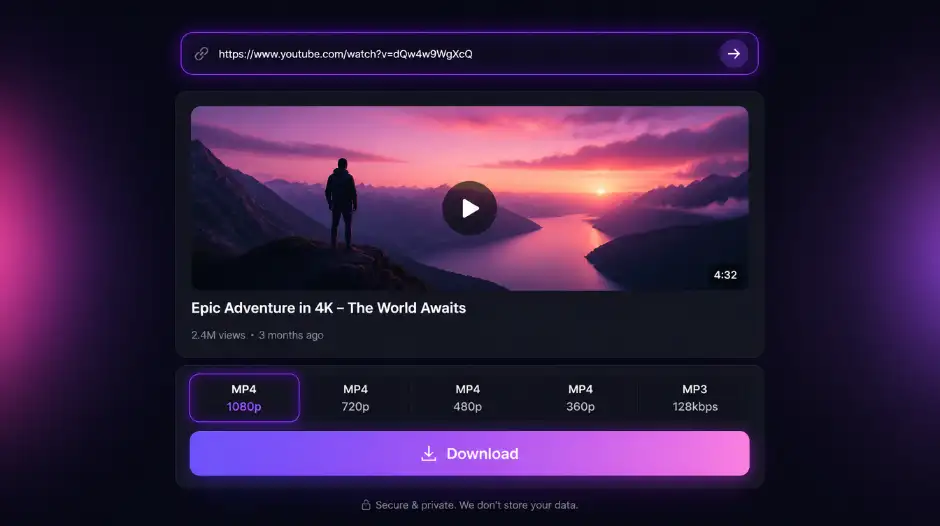
Works with standard youtube.com/watch links, youtu.be short links, and YouTube Shorts. Paste the URL, pick your quality, and save the file directly from your browser.
For personal use only. Respect copyright and YouTube's terms of service. GetTwitterRetweet is not affiliated with YouTube or Google.
HD quality options
Pick your resolution from the available quality options — up to 1080p HD, depending on what the source video was uploaded at.
Any device, no install
Works in Chrome, Safari, Firefox, and mobile browsers. No app, no extension, no account — just paste and download.
Grow your channel
Got your video sorted? Explore our YouTube views, subscribers, and likes to accelerate your reach.
Why People Download YouTube Videos — and Who Actually Does It
YouTube has no built-in download option for most users — the offline feature that exists is locked behind a Premium subscription and only works inside the app, not as a transferable file. If you want an actual video file you can keep, edit, or move to another device, there's no native path to get one. This tool fills that gap — paste a public video URL, get the file, done.
No login. No app install. No Premium subscription required.
What this tool actually does
It extracts the direct video source from a public YouTube URL and returns a clean download link. What you get is the actual video file — not a screen recording, not a re-encoded copy stripped of quality. The resolution matches what YouTube retained from the original upload, with multiple quality options typically available depending on what was uploaded.
It works on standard YouTube videos, including content from creator channels, educational uploads, and public broadcasts. Unlisted and private videos won't process — the tool only handles publicly accessible content, which is the correct boundary and covers the overwhelming majority of what's on the platform.
Who uses it
The most common case is creators recovering their own uploads. A video edited and exported once, uploaded to YouTube, and never backed up locally is one hard drive failure away from being gone for good. This tool pulls the file back at the best available quality — useful for re-editing, archiving, or moving content to another platform.
Educators and students use it to save lectures, tutorials, and training videos for offline viewing — particularly useful in situations with unreliable internet access where streaming isn't a realistic option. Researchers and journalists use it to preserve public statements and announcements before a video gets taken down, made private, or removed during a channel cleanup.
Social media managers use it to repurpose long-form YouTube content into clips for other platforms — that only works with the actual file, not a streaming link. It's also useful for anyone building an offline media library from public domain content, royalty-free footage, or anything they have clear rights to keep.
How it works
- Copy the URL of the YouTube video you want to download.
- Paste it into the field above and click Get Video.
- Wait a moment for the preview and quality options to load.
- Select your preferred resolution and click Download to save the file to your device.
If nothing loads, the video is most likely unlisted or private. Test by opening the URL in a private browser window without being logged into YouTube — if it plays there, the download will work.
On video quality
YouTube stores videos at multiple resolutions for adaptive streaming. This tool fetches the highest-quality version available from the source URL — up to the original upload resolution where YouTube retained it. You won't get anything above what was uploaded, but you'll avoid the quality loss that comes from screen recording, which adds compression on top of compression and caps out at your device's display resolution.
A note on rights: This tool works on publicly accessible videos, but using it responsibly is on you. Downloading your own content, public domain material, or anything you have explicit permission to use is straightforward. Downloading copyrighted content you don't have rights to can run into legal issues depending on your jurisdiction and intended use — this tool doesn't make that determination for you.
Free, no sign-up required
Nothing to install, nothing to register, no usage cap behind a paywall. The tool runs entirely in your browser, processes the URL, and hands you the file. Nothing is stored, nothing is logged. Public videos only — by design.
Frequently asked questions
Do I need a YouTube account or Premium to use this?
No. Paste any public YouTube video URL — no login, Premium subscription, app install, or browser extension required.
What video quality will I get?
The highest resolution YouTube retained for that upload — often with multiple quality options to choose from. You won't exceed the original upload, but you avoid the extra compression and resolution cap from screen recording.
Why won't my video load?
Private, unlisted, age-restricted, and deleted videos cannot be fetched. Open the same URL in a private/incognito window while logged out — if YouTube asks you to sign in or the video doesn't play, the tool cannot access it either.
Does it work on Shorts and long-form videos?
Yes. Any public YouTube video URL — Shorts, standard uploads, lectures, and public live replays — as long as the video is publicly accessible.
What file format will I get?
Typically MP4 — the standard container YouTube uses for video streams. The file is pulled from YouTube's media servers, not captured via screen recording.
Is it legal to download YouTube videos?
Downloading content you own or have permission to save is fine. Respect copyright and YouTube's terms — do not download someone else's work without rights. This tool is not affiliated with Google or YouTube.
Does this tool store my links?
No. URLs are processed to return download links. We don't log what you download or require an account.
How it works
- Copy the YouTube video URL from your browser address bar or the Share → Copy link button on the video.
- Paste the URL into the box above and click Get video.
- When the thumbnail and title load, choose your preferred quality from the dropdown.
- Click Get download link, then hit Download video to save the file to your device.