TikTok Photo Downloader
Paste your TikTok photo link
Works with tiktok.com/@user/photo/… slideshow links. For videos, use our TikTok video downloader.
Respect TikTok terms and music rights on slideshows. Not affiliated with TikTok.
Slideshows
Supports TikTok photo carousels — pick a slide when multiple images are returned.
Photo URLs
Built for /photo/ post links, not standard /video/ clips.
TikTok growth
Explore TikTok services on our prices page.
Save TikTok Photo Posts and Slideshows
TikTok isn't just a video app anymore — photo slideshows have become one of its most popular formats, often packed with multiple images set to music. The problem is TikTok gives you no way to save those photos individually, only the option to download the whole thing as a video with TikTok's watermark slapped across it. This tool fixes that — paste a public slideshow URL, get each photo as a separate file, done.
No login. No app install. No watermark covering half the image.
What this tool actually does
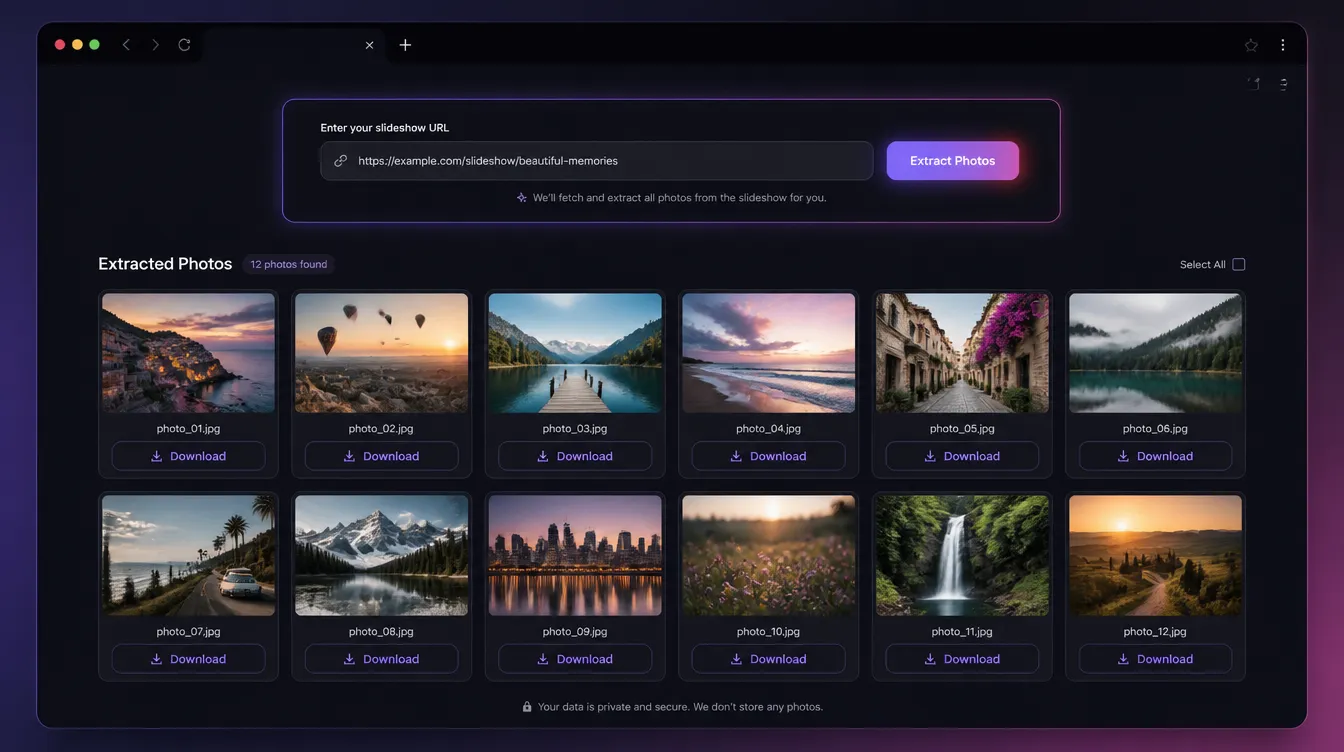
It extracts each individual image from a public TikTok photo post and returns clean download links for every slide. What you get are the actual source images — not frames grabbed from a video export, not screenshots, and without TikTok's logo overlay. Resolution matches what TikTok retained from the original upload.
It works on standard TikTok photo/slideshow posts from public accounts. Private accounts and restricted content won't process — the tool is built for publicly accessible posts only, which covers the vast majority of TikTok's photo content.
Who uses it
The most direct use case is creators recovering their own slideshow images. A lot of TikTok photo posts are assembled directly in-app from images that were never saved as a set anywhere else. If you need those originals back — for reposting elsewhere, building a portfolio, or just archiving your own work — this tool gets you each photo individually, not bundled into a watermarked video clip.
Social media managers use it to repurpose well-performing TikTok photo content for Instagram carousels, Pinterest, or blog posts. A slideshow that worked on TikTok often translates well to other formats, but only if the individual images are available as clean files. Converting the watermarked video export back into usable photos isn't a realistic option.
Designers and content teams use it to pull reference images from TikTok slideshows — aesthetic boards, product photo examples, layout ideas — for internal use. Having the actual image file at full resolution makes a real difference compared to a frame pulled from a compressed video.
It's also useful for anyone documenting or archiving photo posts before they're deleted. TikTok content gets removed for all kinds of reasons, and a slideshow's individual images are often more useful preserved separately than as a single combined video.
How it works
- Open the TikTok photo post you want and copy the link from the share menu or your browser's address bar.
- Paste the URL into the field above and click Get Photos.
- Wait a moment for the previews to load — each slide will appear individually.
- Download each photo separately, or use the download-all option if available.
If nothing loads, the account is most likely private. Test by opening the URL in a private browser window without being logged into TikTok — if the post is visible there, the download will work. If not, the content is restricted.
No watermark — why that matters
TikTok's standard "save" option exports the entire slideshow as a single video with the TikTok logo burned into every frame. That's fine for reposting as-is, but useless if you actually need the source images — for editing, resizing, or reformatting for another platform. This tool returns each image as a clean file, exactly as it was uploaded, with nothing overlaid on top.
Free, no sign-up required
Nothing to install, nothing to register, no usage cap behind a paywall. The tool runs entirely in your browser, processes the URL, and hands you the files. Nothing is stored, nothing is logged. Public posts only — by design.
Frequently asked questions
Do I need a TikTok account to use this?
No. Paste any public TikTok photo post URL — no login, app install, or browser extension required.
Does it work on photo slideshow posts?
Yes. Standard TikTok photo posts and multi-image slideshows from public accounts are supported. Each slide is returned as a separate download link.
Why won't my post load?
Private accounts, restricted profiles, and deleted posts cannot be fetched. Open the same URL in a private/incognito window while logged out — if TikTok asks you to log in or the post isn't visible, the tool cannot access it either.
Are the downloads watermark-free?
Yes. You get the source images without TikTok's logo overlay — not frames extracted from a watermarked video export.
Can I download all slides at once?
Each slide appears with its own download link. Use the download-all option when available, or save images individually — whichever fits your workflow.
What image quality will I get?
The highest resolution TikTok retained from the original upload — the same quality as the source files, not compressed frames from a video export.
Can I download from private accounts?
No. The tool only works on publicly accessible posts. If the content doesn't load in a logged-out browser window, it won't process here either.
Does this tool store my links?
No. URLs are processed to return download links. We don't log what you download or require an account.
How it works
- Copy the TikTok photo post link (Share → Copy link).
- Paste it above and click Get photos.
- Choose a slide if needed, then download the image.